How to Automatically Capture Lead Data at Trade Shows with HubSpot?
Trade shows and field events create a lot of activity, but too often they create very little usable data. Reps have real conversations, yet the details that matter most (what a prospect wanted to try, which product they scanned, which session they attended, etc) never make it cleanly into HubSpot.
That leaves teams with incomplete records, generic follow-up, and weak attribution. The opportunity was real, but the CRM never captured the context behind it.
ON THIS PAGE
- Why event data disappears
- The architecture that fixes it
- Pre-event QR generation
- On-site scanning with pre-filled forms
- Custom objects for each interaction
- Example from a test ride event
- Where this applies
- Three questions to assess your setup
- FAQ
Why event data disappears
Most trade show workflows are built to collect names, not intent. A rep meets a prospect, scribbles a few notes, and promises to follow up later. By the time the event ends, the contact may exist in HubSpot, but the interaction history does not.
That gap has a cost. Reps waste time asking for information they should already have. Marketing sends broad follow-up because the CRM does not show which product, demo, or experience actually mattered.
The architecture that fixes it
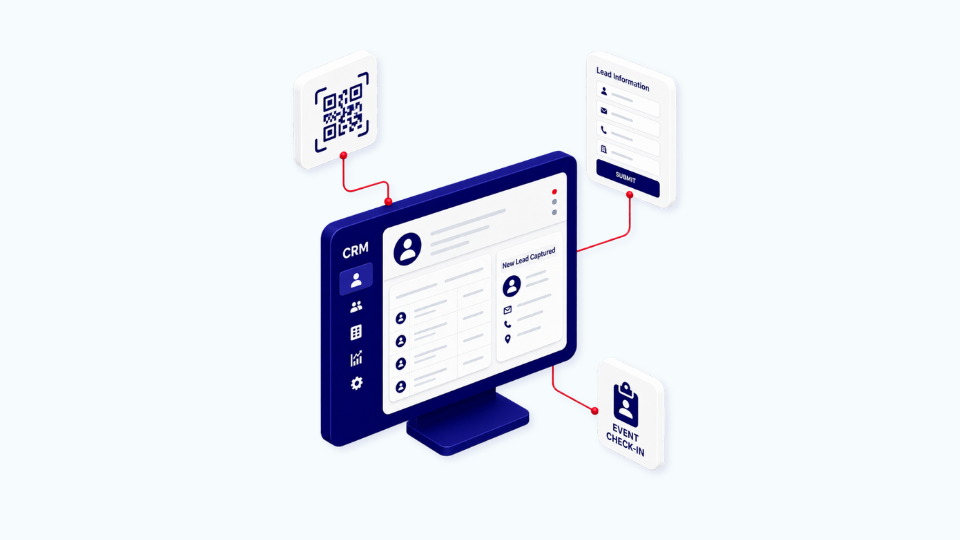
The solution is a simple event architecture built from HubSpot, one marketplace app, and a custom object model that captures each interaction as structured data.
It works in three parts:
- Identify the attendee before the event.
- Capture the interaction on site.
- Write the result back to HubSpot in a way the CRM can actually use.
This turns the booth from a manual data-entry point into a real capture flow.
Pre-event QR generation
When someone registers, HubSpot creates the contact and triggers a personal QR code by email. That QR code represents the attendee’s identity, not just their ticket.
This matters because it removes the need to collect the same basic details again at the booth. The rep can start from a known contact instead of a blank form.
On-site scanning with pre-filled forms
At the event, the rep scans the attendee’s QR code. A tablet form opens with the contact’s details already filled in, so there is no need to ask for name, email, or company again.
The rep then scans the product, demo, or session the attendee wants to engage with. That action creates a new record tied to the contact and captures the interaction while it is still fresh.
Custom objects for each interaction
Each demo, trial, or session is logged as its own HubSpot custom object record linked to the contact. This is the part most teams miss.
Custom objects let you store event behavior as structured data instead of burying it in notes or forcing it into a deal stage where it does not belong. That gives you cleaner reporting, better segmentation, and follow-up that reflects what actually happened at the event.
After the event, an automated email can summarize every product the attendee engaged with. A short survey can capture preferences. Everything writes back to the contact record.
Example from a test ride event
A mobility brand running test ride events needed this in a high-volume setting. Each attendee tried multiple products in one afternoon, and reps were re-asking for name and email at every interaction.
That created duplicate work, mixed-up data, and generic post-event follow-up. The team knew who attended, but not what each person actually experienced.
We replaced that workflow with a QR app from the HubSpot marketplace, a custom object structure, and workflows built around the event journey. The result was a cleaner capture process that matched the pace of the event instead of slowing it down.
Where this applies
This approach is not limited to trade shows. It works anywhere reps need to capture identity and specific engagement in the same flow.
It is especially useful for:
- Trade show booths with product demos.
- Equipment trials or machine testing days.
- Dealer or partner roadshows.
- On-site product evaluations at prospect facilities.
- Broker days for insurance, finance, or wholesale.
If your reps keep asking prospects to repeat information your CRM already has, and if the thing they engaged with never reaches the contact record, the issue is not the event itself. It is the data structure underneath it.
Three questions to assess your event tech
Before your next event, ask these three questions:
- Do your reps ask prospects for information you already have in HubSpot?
- Can you see which specific products or sessions a contact engaged with without opening a spreadsheet?
- Is your post-event follow-up tailored to what each person actually did?
If two of those answers are no, your event process is probably generating activity without generating usable CRM data.
FAQ
What is a HubSpot custom object?
A HubSpot custom object is a record type you define yourself, beyond contacts, companies, deals, and tickets. It is useful for tracking business-specific entities such as demo sessions, test rides, equipment trials, or contracts. Each custom object record can be linked to other HubSpot records, including contacts and deals.
How do QR codes connect to HubSpot?
QR codes do not connect to HubSpot natively. A marketplace app can generate them through workflows. When a contact registers, the workflow triggers code creation and emails the QR code to that contact. Scanning the QR code can open a pre-filled form that writes data back to HubSpot.
Is a paid marketplace app required?
For production use at scale, usually yes. Free options can work for small volumes, but event setups typically need a paid app from the HubSpot marketplace. Each generated code often consumes a credit, so volume matters.
How long does this setup take?
A first build usually takes a few weeks once the requirements are clear. After that, the same architecture is much faster to replicate across events or business units.
Does this work for B2B trade shows too?
Yes. The pattern applies directly to B2B trade shows, equipment demos, dealer events, and similar field events. The object structure changes to match your process, but the core logic stays the same.
The goal is not just to speed up check-in. It is to turn event activity into structured CRM data that improves attribution, follow-up, and pipeline visibility. If your trade show process still ends with notes in a spreadsheet and a “Met at event” tag in HubSpot, the real opportunity is still being lost.